10.7 Настройка BGP
10.7.1 Введение в функционал
BGP ( Border Gateway Protocol) — протокол маршрутизации между автономными системами (AS). Основная задача системы, использующей BGP, заключается в обмене информацией о достижимости сетей с другими системами BGP. Эта информация включает список автономных систем (AS), через которые проходит маршрут до определённой сети. Эти данные позволяют построить граф связности AS, который используется для устранения маршрутизационных петель и применения политик маршрутизации на уровне AS.
BGP-4 предоставляет механизмы для поддержки бесклассовой междоменной маршрутизации (CIDR, Classless Inter-Domain Routing).
Эти механизмы включают возможность анонсирования группы сетей в виде IP-префиксов и отказ от использования классов сетей в рамках BGP. Кроме того, BGP-4 поддерживает агрегирование маршрутов, включая объединение путей AS (AS-path aggregation).
Информация о маршрутизации, передаваемая через BGP, поддерживает только подход маршрутизации на основе назначения (destination-based forwarding). Это означает, что маршрутизатор принимает решения о пересылке пакетов исключительно на основе IP-адреса назначения, указанного в заголовке пакета. Такой подход определяет, какие политики могут (и не могут) быть реализованы с использованием BGP.
BGP может поддерживать только те политики, которые соответствуют парадигме маршрутизации на основе назначения.
10.7.2 Конфигурация
Настройка EBGP
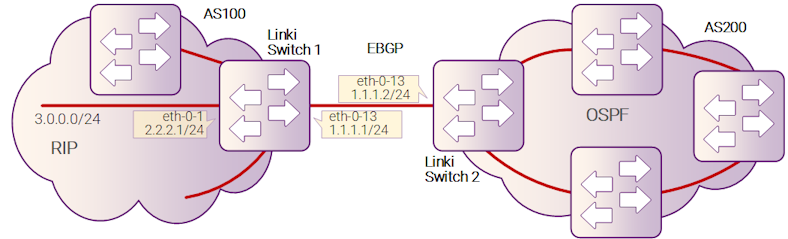
Рисунок 10-19 EBGP
Шаг 1: Войдите в режим конфигурации
Switch# configure terminal
Шаг 2: Настройте интерфейсы и задайте их параметры
Switch1:
Switch(config)# interface eth-0-13
Switch(config-if)# no shutdown
Switch(config-if)# no switchport
Switch(config-if)# ip address 1.1.1.1/24
Switch(config-if)# exit

Switch(config)# interface eth-0-1
Switch(config-if)# no shutdown
Switch(config-if)# no switchport
Switch(config-if)# ip address 2.2.2.1/24
Switch(config-if)# exit
Switch2:
Switch(config)# interface eth-0-13
Switch(config-if)# no shutdown
Switch(config-if)# no switchport
Switch(config-if)# ip address 1.1.1.2/24
Switch(config-if)# exit
Шаг 3: Настройте статический маршрут на Switch1
Switch(config)# ip route 3.3.3.0/24 2.2.2.2
Шаг 4: Настройте процесс маршрутизации BGP
Switch1:
Switch(config)# router bgp 100
Switch(config-router)# bgp router-id 10.10.10.10
Switch(config-router)# neighbor 1.1.1.2 remote-as 200
Switch(config-router)# neighbor 1.1.1.2 ebgp-multihop
Switch(config-router)# network 4.0.0.0/8
Switch(config-router)# redistribute static
Switch(config-router)# redistribute connected
Switch(config-router)# exit
Switch2:
Switch(config)# router bgp 200
Switch(config-router)# bgp router-id 11.11.11.11
Switch(config-router)# neighbor 1.1.1.1 remote-as 100
Switch(config-router)# neighbor 1.1.1.1 ebgp-multihop
Switch(config-router)# redistribute connected
Switch(config-router)# exit
Шаг 5: Выйдите из режима конфигурации
Switch(config)# end
Шаг 6: Проверка
Для проверки соседей BGP используйте следующую команду:
Switch1:
Switch# show ip bgp neighbors
BGP neighbor is 1.1.1.2, remote AS 200, local AS 100, external link
  BGP version 4, remote router ID 0.0.0.0
  BGP state = Active
  Last read 00:26:00, hold time is 180, keepalive interval is 60 seconds
  Received 0 messages, 0 notifications, 0 in queue
  Sent 0 messages, 0 notifications, 0 in queue
  Route refresh request: received 0, sent 0
  Minimum time between advertisement runs is 30 seconds
 For address family: IPv4 Unicast
  BGP table version 1, neighbor version 0
  Index 1, Offset 0, Mask 0x2
  0 accepted prefixes
  0 announced prefixes
 Connections established 0; dropped 0
  External BGP neighbor may be up to 255 hops away.
 Next connect timer due in 87 seconds
Switch2:
SwitchB# show ip bgp neighbors
BGP neighbor is 1.1.1.1, remote AS 100, local AS 200, external link
  BGP version 4, remote router ID 0.0.0.0
  BGP state = Active
  Last read 00:21:39, hold time is 180, keepalive interval is 60 seconds
  Received 0 messages, 0 notifications, 0 in queue
  Sent 0 messages, 0 notifications, 0 in queue
  Route refresh request: received 0, sent 0
  Minimum time between advertisement runs is 30 seconds
 For address family: IPv4 Unicast
  BGP table version 1, neighbor version 0
  Index 1, Offset 0, Mask 0x2
  0 accepted prefixes
  0 announced prefixes
 Connections established 0; dropped 0
  External BGP neighbor may be up to 255 hops away.
Next connect timer due in 97 seconds
Настройка IBGP
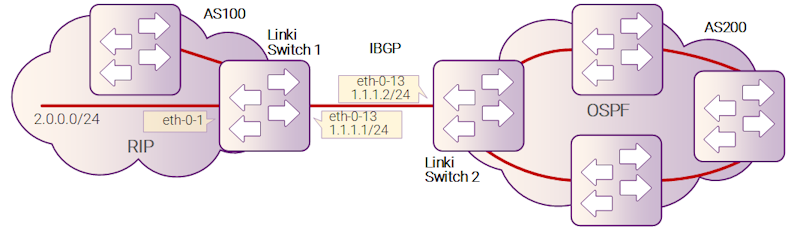
Рисунок 20-20 IBGP
Шаг 1: Вход в режим конфигурации
Switch# configure terminal
Шаг 2: Настройка интерфейсов и их параметров
Switch1:
Switch(config)# interface eth-0-1
Switch(config-if)# no shutdown
Switch(config-if)# no switchport
Switch(config-if)# ip address 2.2.2.1/24
Switch(config-if)# exit

Switch(config)# interface eth-0-13
Switch(config-if)# no shutdown
Switch(config-if)# no switchport
Switch(config-if)# ip address 1.1.1.1/24
Switch(config-if)# exit

Switch(config)# interface loopback 0
Switch(config-if)# ip address 10.10.10.10/32
Switch(config-if)# exit
Switch2:
Switch(config)# interface eth-0-13
Switch(config-if)# no shutdown
Switch(config-if)# no switchport
Switch(config-if)# ip address 1.1.1.2/24
Switch(config-if)# exit

Switch(config)# interface loopback 0
Switch(config-if)# ip address 11.11.11.11/32
Switch(config-if)# exit
Шаг 3: Настройка статического маршрута
Switch1:
Switch(config)# ip route 11.11.11.11/32 1.1.1.2
Switch2:
Switch(config)# ip route 10.10.10.10/32 1.1.1.1
Шаг 4: Настройка процесса маршрутизации, ID маршрутизатора, соседа, сети и атрибутов перераспределения
Switch1:
Switch(config)# router bgp 100
Switch(config-router)# bgp router-id 10.10.10.10
Switch(config-router)# neighbor 11.11.11.11 remote-as 100
Switch(config-router)# neighbor 11.11.11.11 update-source loopback 0
Switch(config-router)# network 4.0.0.0/8
Switch(config-router)# redistribute static
Switch(config-router)# redistribute connected
Switch(config-router)# exit
Switch2:
Switch(config)# router bgp 100
Switch(config-router)# bgp router-id 11.11.11.11
Switch(config-router)# neighbor 10.10.10.10 remote-as 100
Switch(config-router)# neighbor 10.10.10.10 update-source loopback 0
Switch(config-router)# redistribute connected
Switch(config-router)# exit
Шаг 5: Выход из режима конфигурации
Switch(config)# end
Шаг 6: Проверка
Switch1:
Switch# show ip bgp neighbors
BGP neighbor is 11.11.11.11, remote AS 100, local AS 100, internal link
  BGP version 4, remote router ID 0.0.0.0
  BGP state = Active
  Last read 00:02:32, hold time is 180, keepalive interval is 60 seconds
  Received 0 messages, 0 notifications, 0 in queue
  Sent 0 messages, 0 notifications, 0 in queue
  Route refresh request: received 0, sent 0
  Minimum time between advertisement runs is 5 seconds
  Update source is loopback0
 For address family: IPv4 Unicast
  BGP table version 1, neighbor version 0
  Index 1, Offset 0, Mask 0x2
  0 accepted prefixes
  0 announced prefixes
 Connections established 0; dropped 0
Next connect timer due in 62 seconds
Switch2:
Switch# show ip bgp neighbors
BGP neighbor is 10.10.10.10, remote AS 100, local AS 100, internal link
  BGP version 4, remote router ID 0.0.0.0
  BGP state = Active
  Last read 00:01:58, hold time is 180, keepalive interval is 60 seconds
  Received 0 messages, 0 notifications, 0 in queue
  Sent 0 messages, 0 notifications, 0 in queue
  Route refresh request: received 0, sent 0
  Minimum time between advertisement runs is 5 seconds
  Update source is loopback0
 For address family: IPv4 Unicast
  BGP table version 1, neighbor version 0
  Index 1, Offset 0, Mask 0x2
  0 accepted prefixes
  0 announced prefixes
 Connections established 0; dropped 0
Next connect timer due in 17 seconds